Morse Code Generator
Use this free Morse code generator to turn text into dots and dashes.
Listen to your message, or download WAV audio and PNG or SVG images.
A space separates letters. A slash separates words. Learn the rhythm
Speed, tone, volume & light signal
Ready when you are. Audio downloads are limited to 120 seconds.
How to use the Morse code generator
Create written patterns, sound, and images for puzzles, classroom activities, and personal projects. For guided practice, choose Morse code worksheets for short words, numbers, or secret messages.
- 01
Write your message
Enter English letters, numbers, or supported punctuation. This text to Morse code conversion updates as you type; spaces in your message become word breaks.
- 02
Generate Morse code audio
Choose “Play Morse” to hear dots and dashes as short and long beeps. Adjust speed, tone, and volume, or enable the optional light signal at a slower speed.
- 03
Download audio or message images
Choose WAV for audio, PNG or SVG for a message image, and text for the written pattern. Downloads contain your message, ready to use.
What is Morse code?
Morse code represents letters, numbers, and punctuation as patterns of short and long signals. We write the short signals as dots and the long signals as dashes; you can send the same patterns with sound or light.
How does text become Morse?
Each character has a pattern in the Morse alphabet. For example, A becomes .- and B becomes -.... The tool puts a space between letters and a slash between words, then uses the right pauses when playing the message.
To read a written message in the other direction, paste its dots and dashes into the Morse code translator.
Try a message
Load I LOVE YOU in Morse code, practice HELP ME, or try a name or number. Each example loads in the tool above, where you can listen or download it.
.. / .-.. --- ...- . / -.-- --- ..-Save I love you in Morse code as a message image or audio greeting.
.... . .-.. .--. / -- .Practice help me in Morse code as ordinary words; this is different from the continuous SOS signal.
.- .-.. . -..-A name can be encoded like any other word.
.---- .----Each digit has its own five-mark pattern.
Learn the language of signals.
The Morse alphabet
Every letter, number, and supported punctuation mark in one easy reference.
Find a character ··· −−− ···Three short. Three long.
Listen to SOS and learn why this simple pattern is recognized around the world.
Understand SOSGive your words a light
Make an Arduino blink your message using its built-in LED and a ready-to-use sketch.
Build a Morse signalHello, world.
These HELLO WORLD files show what the Morse code generator produces: the original text, its dot-and-dash pattern, audio, and images. The WAV uses 20 WPM, a 600 Hz tone, and 35% volume.
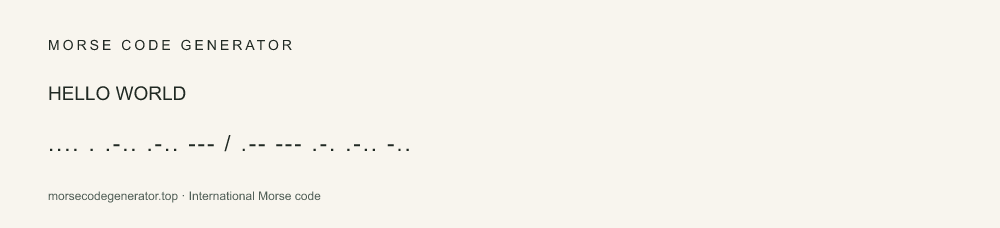
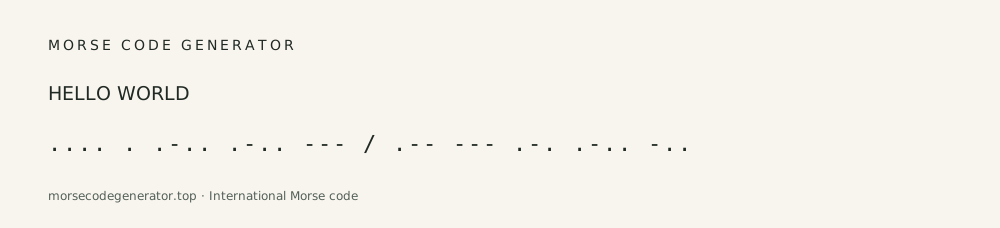
/ .-- --- .-. .-.. -..Letters have spaces. Words have a slash.
Before you send.
What can the Morse code generator convert?
English letters A–Z, numbers 0–9, and the punctuation listed in our alphabet chart. Lowercase text becomes uppercase. Emoji and unsupported letters need to be removed or replaced before you can play or export a message.
How do I translate Morse code back to text?
Select “Morse to text.” Use dots and dashes, a space between letters, and a slash between words. For example, .... .. becomes HI. If you have an audio recording, this tool cannot decode it automatically.
Can I use the Morse code generator on my phone?
Yes. Open this page in a phone or tablet browser to type, listen, and download. No app installation is needed. Your browser may open a downloaded file in a preview or save it to Files; use its share or save action to keep a copy.
Can I download Morse code as an MP3?
Download your Morse audio as WAV first. WAV keeps the sound without lossy compression and works in common audio editors. If you need an MP3 for a music player or a smaller file to share, use AudioConvert’s WAV to MP3 converter to convert the downloaded file.
What does WPM mean?
WPM means words per minute, measured using the standard five-letter word PARIS and its pauses. A higher number makes both signals and gaps shorter. Read the timing guide for a breakdown.
Can I use the light signal without sound?
Yes. Enable “Show light signal,” keep the speed at 7 WPM or below, and set the volume to 0%. Flashing patterns may be uncomfortable or unsafe for sensitive users. The light is disabled if your device requests reduced motion.
Is my message saved or sent anywhere?
Your message is converted and exported in your browser. We do not save message text. The site remembers your audio settings on this device; see the privacy page for hosting details.